

How it works
How Substrike works
The detail behind the short home page: what happens to a folder of clips, what Substrike checks, how accurate it is on hard game audio, what uses the internet, and how it compares.
From a folder of clips to finished files
Substrike works on clips you have already saved, for example with the OBS replay buffer.
-
Step 1
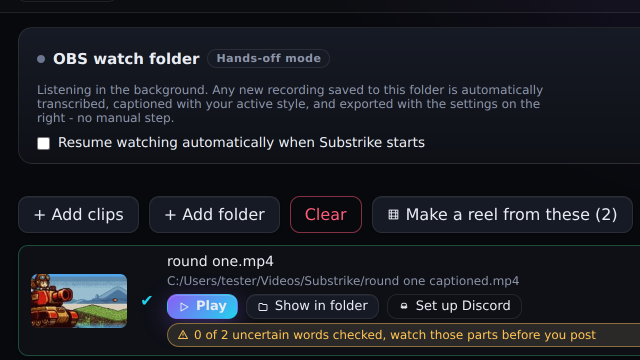
Drop a folder, or let OBS feed it
Add a folder of clips, or point Substrike at your OBS output folder and new clips are captioned as they are saved while Substrike is open. Watching only picks up clips saved after you start it, not a background service; add older clips with Add folder. Each clip is transcribed on your PC and exported with the settings you chose.
The batch list is saved as it runs. If Substrike closes or crashes, the list comes back and interrupted clips are retried. A clip that fails is reported and the rest carry on.
-
Step 2
It checks its own work
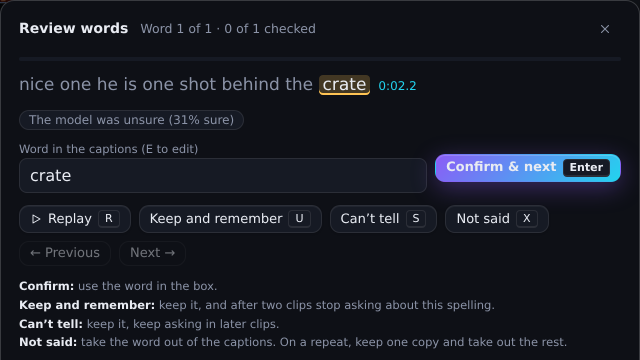
Every word is re-timed against the audio, so captions appear as the words are spoken. The AI cleanup then flags the words it is unsure of.
A clip with three or fewer unsure words exports on its own, with the count shown. A clip with more waits for you, with those words highlighted, so your review goes straight to the likely mistakes. A quick watch before posting is still the best final check.
-
Step 3
Export for where it is going
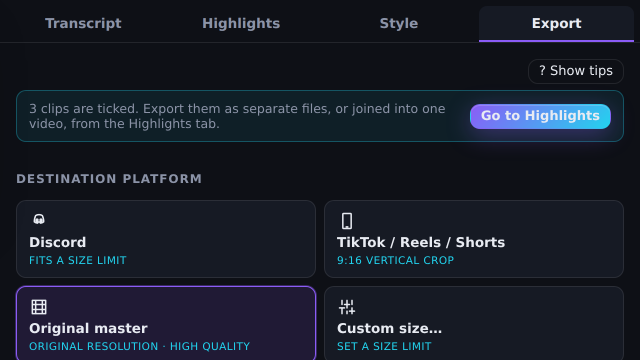
Fit a Discord upload limit, go vertical (9:16) for TikTok, Instagram Reels and YouTube Shorts, keep the original widescreen size for YouTube and Discord, or join the whole batch into one reel.
Substrike can post the reel and a digest to your Discord. For TikTok, YouTube and Instagram, you upload the finished file.
 Step 1
 Step 2
 Step 3

Built to clear the backlog
Every feature below is here to get a clip out of your folder and off to your mates, without you typing the captions yourself. You still check the words it flags.

The whole folder, hands off
Batch a folder, or watch your OBS folder and caption clips as they land. Tick one box and watching resumes when Substrike starts.

Survives a crash
The batch list is saved with every clip’s status. After a crash or restart it comes back, and interrupted clips are retried.

Words that land on time
Forced alignment re-times each word against the audio, so word-by-word captions pop when they are said.

A safety net for unsure words
AI cleanup flags the words it doubts. Clips with three or fewer export automatically, the rest wait for you. Add names and game jargon, and every fix you accept is remembered for next time.

Sized to fit, and checked
“Fit under 50 MB” measures the finished file and re-encodes, up to twice, if it came out over. Vertical 9:16 follows on-screen motion, or pick Fill or Fit.

One reel, posted for you
Turn a finished batch into a reel, reorder it, drop what you do not want. Optionally post the reel and a session digest to Discord through your own webhook.
Wait, did you see that? Three in a row!
Word-by-word captions, exactly as previewed
Animated captions are burned into the exported video, in the style you pick, with a colour for each speaker. The caption fonts ship inside Substrike, so what you see in the preview is what ends up in the file. Need to edit them elsewhere? Tick one box and an SRT subtitle file is saved next to the video too.
Tested on the hard stuff first
~70%
of words right on the hardest audio we have: three players talking over each other in proximity chat, on top of game audio.
That is 2 clips, 207 words, about 70 seconds, from one recording setup, checked by one person, the developer. It is a hard case, not an average, and more clips are being checked now.
Friends talking over each other on top of gunfire and music is some of the hardest audio for speech recognition, so that is where we started measuring. We expect clean speech to do better, and will publish that figure once it is measured.
Substrike is built around the errors it does make. The AI cleanup flags the words it is unsure of, and only clips with three or fewer unsure words export without you. Everything else waits, with the doubtful words highlighted. Add player names and game terms in the names and jargon field, and fixes you accept are remembered.
We ran other speech models on the same clips
On our own voice chat test clips, Substrike’s local setup made the fewest errors in total of the models we scored, including a paid cloud speech service, level with Voxtral Mini within the noise of a test this small.
What captioning costs elsewhere
| App | Plan | Cost per year | Uploads your clips |
|---|---|---|---|
| Submagic | Starter | US$144, billed yearly | Yes |
| Captions | Max | US$299.88, billed monthly | Yes |
| Opus Clip | Starter | US$180, billed monthly | Yes |
| Substrike | One purchase | US$39 once (US$29 for the first 300 buyers) | Not for captioning. Optional Discord posting uploads your export. |
Raw cloud transcription services cost less per hour, but they are developer tools with no editor or export. See the methods page.
| Model | Where it runs | Errors | Errors per 100 words |
|---|---|---|---|
| Substrike as shipped whisper large-v3-turbo with repeat cleanup | Your PC | 101 | 26.4 |
| Mistral Voxtral Mini 3B | Local model | 105 | 27.4 |
| Qwen3-ASR 1.7B | Local model | 138 | 36.0 |
| ElevenLabs Scribe v1 Paid cloud servicegiven the original, unfiltered audio | Paid cloud service | 143 | 37.3 |
| OpenAI whisper medium.en | Local model | 145 | 37.9 |
| NVIDIA Parakeet TDT 0.6B v2 | Local model | 174 | 45.4 |
These six are a selection from 26 local model setups we scored, plus one cloud service. None of the others made fewer errors than Substrike. The 4 error gap to Voxtral Mini is inside the noise of a test this small, so treat those two as level.
A caveat that may favour us. Two of the three answer keys began as a Substrike transcript that was then corrected by hand, which can favour whisper based setups. The third clip was typed from scratch. On that one, Substrike made 51 errors, Voxtral Mini 49 and ElevenLabs Scribe 58.
An earlier cloud test, measured differently. On 17 September 2026 one clip (152 words) went through three cloud services, scored as the share of words matched, so it cannot be set against the table. Substrike matched 68.4%, ElevenLabs Scribe v2 65.8%, AssemblyAI Universal 56.6% and Deepgram Nova-3 52.0%. One clip, one run each.
Word timing. Six larger timing models, on our one hand-timed clip (149 words), placed words no measurably closer than the one Substrike ships.
Voice matching. Of 19 speaker models tried on our clips, the one Substrike ships was in a four way tie at the top.
An earlier test against paid cloud services: one clip, 17 September
Share of words matched.
One hand-checked clip, 152 words, 17 September 2026, share of words matched. Higher is better.
On 27 September, ElevenLabs Scribe v1 made more errors than Substrike across all three test clips (143 against 101).
How thin this is. 3 clips, 383 words, about 3.2 minutes of audio, checked by one person, all from our own gaming voice chat and one recording setup. It is not a general benchmark, and results on your audio may differ. Each model ran once with its default settings. Cloud models change over time, and these are the versions we reached on 27 September 2026.
Clips, scoring and model versions. Scores and censored transcripts are available on request.
Model and company names are trademarks of their owners. Substrike is not affiliated with or endorsed by them.
Your PC does the work
- No upload waitA recording does not travel anywhere before it is captioned.
- No meterNo per-minute fees or credits for processing.
- Voice chat stays putYour friends’ voices are transcribed on your PC, not sent to a speech service.
- Works offline once set upCaptioning and export work without a connection after the models are downloaded.
What uses the internet
- Downloading the speech models once, from inside the app (about 3.1 GB for the recommended set).
- Checking for updates.
- Posting to Discord, only if you set up a webhook.
- Importing your Twitch clips, only if you connect a Twitch account.
- One online check when you first enter a licence key (planned, not in the test build yet).
No footage is uploaded to Substrike or a speech service for processing. Files leave your PC only if you post to Discord or send us a support attachment. The other connections are model and update downloads, optional Twitch clip import and a future one-time licence check. The privacy notice lists every connection.
Where Substrike fits
General categories, not named products.
| Question | Substrike | Cloud clip tools | By hand, or free subtitle tools |
|---|---|---|---|
| Where your footage is processed | On your PC | On the provider’s servers, after you upload it | On your PC |
| A whole folder in one go | Yes: a batch queue and an OBS watch folder | Upload each recording first | Usually one clip at a time |
| Checking the words | Unsure words flagged. Clips with more than three wait for you | You read the captions yourself | You type or check every word |
| How you pay | Pay once | Usually a subscription or credits | Free, plus your time |
| Picks the moments for you | No, you choose the clips | Often, that is what many are built for | No |
| Spoken languages | English today. Spanish, Portuguese, French, German and Italian in beta, accuracy not yet measured. Captions can also be translated after transcription. | Often many | Whatever you type |
Want something to find the moments in a four-hour recording, or a full timeline editor? A cloud clip tool or an editor will suit you better. Substrike is the batch step after a session, on clips you already picked.
Who it is for
Substrike is for you if
- You save clips with the OBS replay buffer and want them captioned in batches.
- You post to Discord, TikTok, Instagram or YouTube and want each clip sized for where it is going.
- You post clips of friends talking and want the footage to stay on your PC.
Look elsewhere if
- You want a tool to pick the best moments from a long recording.
- You speak a language other than English and need captions you can trust without checking them (Spanish, Portuguese, French, German and Italian are only in beta), or you use a Mac or Linux PC.
- You need a full timeline video editor.
Questions
 Questions
If yours is not here, ask support.
Does it upload my footage?
No. Footage is not uploaded to Substrike or a speech service for processing. Files leave your PC only if you choose to post to Discord or send us a support attachment. The other connections are model and update downloads, optional Twitch clip import and (planned) a one-time licence check. The privacy notice lists every connection.
Does it work offline?
Yes, once the models are downloaded. Updates, Discord posting and the one-time licence activation (planned, not in the test build yet) need a connection.
What happens to clips it is unsure about?
A clip with more than three unsure words, or one the cleanup could not check, waits in the batch for you with those words highlighted. Clips with three or fewer export and show their count, so you can spot-check them later.
Does it find highlights for me?
No, you choose the moments. Substrike is built for clips you already saved. There is an experimental highlights finder for long recordings, which ranks loud, excited audio.
Does it work with Medal, ShadowPlay or any MP4?
It works on video files, not on one recorder. Folders and the watch folder pick up .mp4, .mkv, .mov, .webm, .avi, .flv, .ts and .m4v. OBS is the setup we build and test around, so try a few clips from other recorders first.
How long does a clip take, and will it slow my game?
Speech recognition runs on your processor at reduced priority, so times depend on your processor and the model you choose. On one fast PC (an 8-core Ryzen 7 9800X3D), the steps of a 2-minute clip, each timed on its own, added up to about 2 to 3 minutes from start to a captioned export. That estimate leaves out the AI cleanup step, which was not timed, and it is one PC and three clips. Slower processors take longer. We have not measured the effect on frame rate while you play, so run batches after a session. The full numbers are on the download page.
What does the watch folder do after a restart?
Your batch list and settings come back. If watching was on, the Batch screen offers Resume watching, or tick the setting to resume automatically on start-up. It picks up clips saved after watching starts; add older clips with Add folder.
How big is the download?
The installer is about 180 MB (the 0.3.3 test build). The recommended models are about 3.1 GB, downloaded once from inside the app. Smaller, faster models are available.
Can it post to TikTok, YouTube or Instagram?
No. It exports files sized and framed for them, and you upload them. It posts to Discord only if you set up your own webhook.
Does it give me an editable subtitle file?
Yes. In the Export tab, tick “Also save subtitles (.srt)” and an SRT file with the same name is saved next to each video, with the same lines and timing as the burned-in captions, speaker names optional. SRT is the plain subtitle format that Premiere, Resolve, CapCut and YouTube import. You can also save the subtitles on their own without rendering a video, or save the styled ASS file the burn-in is made from.
Is there a subscription or a trial?
No subscription: one purchase covers every 1.x release. A 7-day free trial from your first successful export is planned for version 1.0, not in the test build yet. Setup also includes a 15-second preview on your own clip before the big model download.
Why might Windows warn me when I install it?
The test build is not yet signed with a Windows publisher certificate, so SmartScreen may show an unrecognised publisher. Signing is being set up before launch.
Is Substrike open source?
No, it is proprietary. It includes FFmpeg (LGPL-2.1) and other open-source components under their own licences. See open source and source offer.
Who is behind Substrike?
Substrike, ABN 34 213 253 985, based in Australia.
Support: support@substrike.com.au. We aim to reply within 24 hours. You can also get help from the community and from us on the Substrike Discord.